

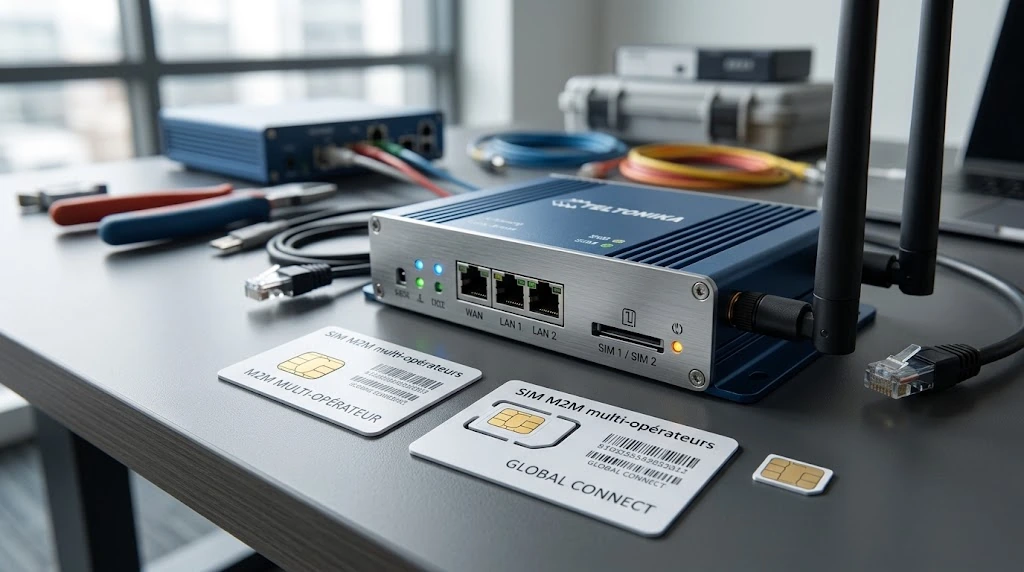
4G Kiosk Connectivity: Zero-Downtime Architecture
A 60-minute network outage across 50 self-service kiosks wipes out €17,500 in revenue.
A misconfigured 4G kiosk connection turns an interactive payment terminal into dead weight. When telemetry drops, transactions stop immediately.
The Black Screen Problem: When Kiosks Become Inactive Hardware
Understanding the operational demands of an autonomous commercial terminal requires setting technical baselines for cellular links.
Technical Specifications of a Mission-Critical Cellular Link for Kiosks
A resilient 4G kiosk setup relies on an industrial M2M cellular router, active multi-carrier redundant SIM cards, an encrypted VPN tunnel, and a private static IP address. This foundation guarantees continuous card processing and secure remote maintenance.
Autonomous kiosk architectures must exclude consumer-grade hardware entirely. The internal modem executes strict routing rules through an IPsec tunnel specified by IETF RFC 4301, isolating application data from the public internet. This connection maintains a permanent bidirectional session for remote diagnostics without relying on unstable local Wi-Fi.
Payment processing requires network round-trip times under 800 milliseconds. Without managed static IP addressing, the payment terminal (POS) fails to maintain its TLS session with the acquiring bank's authorization server.
Financial Impact of a Lunch-Hour Network Drop
Network drops hit without warning. A customer builds an order, inserts their card, and the screen freezes on a loading wheel. The integrated payment terminal waits for a TCP acknowledgment that a saturated or desynchronized cell tower never returns.
The terminal times out after 30 seconds of inactivity. The software cancels the cart and resets the interface. The customer faces a blank error message.
Orders immediately back up to the staffed counter. Lines form in under four minutes. Walk-ins see the crowded counter and leave the store.
Financial Trade-Off: Network Outages vs. Industrial Connectivity
- Incident Scenario: A 1-hour unmanaged failure across 50 ordering kiosks during the noon peak (average ticket: €14, nominal throughput: 25 transactions per hour per machine).
- Immediate Top-Line Loss: 50 units × 25 orders × €14 = €17,500 in lost revenue in 60 minutes.
- Secondary Impact: Front-line staff reassigned to manual order entry alongside immediate customer friction.
- Unit Economics: Running multi-carrier industrial cellular infrastructure with defined SLAs costs an incremental €30 to €50 per unit monthly. That equals the margin of three preserved orders per machine across an entire year. This requirement aligns with the operational standards in our guide on SLA and high availability for critical infrastructure.
Consumer Hardware Limits and Civil Engineering Delays
Plugging a consumer USB dongle or a residential modem into a payment kiosk causes field failures. Consumer gear cannot withstand commercial enclosure conditions.
The Faraday Enclosure and Thermal Throttling in Standard Modems
Kiosk housings are sealed steel enclosures. They trap heat. Without active venting or passive cast-aluminum heat sinks, a standard modem processor overheats quickly under load from the internal computer and display. High internal temperatures trigger thermal clock throttling, eventually freezing the operating system.
Radio reception suffers identical performance drops. Steel panels act as a Faraday cage. Without external SMA connectors linked to cross-polarized antennas for 3GPP MIMO standards, signal loss frequently exceeds 25 dB. The cellular modem struggles to maintain its link. Consumer dongles lack hardware watchdogs; when signal instability freezes the radio stack, the modem enters a dead software loop requiring an on-site technician to cycle the power.
This failure pattern illustrates why deploying a cellular 5G dongle for enterprise deployments fails to meet commercial hardware standards.
Why Carrier-Grade NAT Blocks Remote Maintenance
Physical RF shielding issues are compounded by carrier-level addressing restrictions that restrict remote operations.
Carrier-Grade NAT (CGNAT) blocks remote support because consumer mobile plans assign shared, non-routable private IPv4 addresses. This architecture blocks inbound sessions, cutting IT teams off from direct SSH access, VNC sessions, remote modem reboots, and outbound SNMP monitoring.
This behavior follows IETF RFC 6598, which allocates the 100.64.0.0/10 block to share public IPv4 pools across thousands of endpoints. For a consumer browsing on a phone, this is invisible. For a transactional kiosk, it creates an operational barrier. IT departments cannot initiate remote troubleshooting without an active, persistent outbound tunnel maintained by the local router.
Lead-Time Delays for Wired Drops in Retail Spaces
To bypass cellular issues, teams sometimes demand dedicated Ethernet or fiber drops. That decision creates significant logistics friction. Routing physical cables to an island kiosk in a high-traffic retail hallway triggers substantial operational overhead.
It requires structural approvals from commercial mall operators, access permits for shared service risers, and night-shift concrete coring. These off-hours construction hours inflate build-out costs. Lead times run between 6 and 12 weeks. Store openings stall while waiting on physical links, delaying time-to-revenue.
Architecture: Treating Each Kiosk as a Hardened Payment Node
A self-service terminal is not an office workstation. Treating it like an everyday web client leaves your payment flow exposed to local signal fluctuations.
Multi-Carrier Cellular Failover Without Provider Preference
Indoor cellular signals encounter reinforced concrete, low-E commercial glass, and metallic structural frames. Relying on a single mobile network operator creates a single point of failure.
Local cell towers undergo unexpected load spikes and maintenance cycles. If an internal modem remains locked to an unavailable carrier, the machine stays offline.
The target architecture relies on an industrial modem with dynamic multi-carrier SIM capabilities, accessing all major national mobile backbones without preset provider priorities. Failover triggers on packet loss thresholds or latency spikes, moving the active radio session to an operational carrier in under 30 seconds.
This design implements standard routing mechanisms from the IETF and ARCEP guidelines, keeping network restoration invisible to users during transactions.
PCI-DSS Traffic Isolation: Separating Monetics From Media Downloads
Payment transactions require minimal bandwidth: an authorization packet requires between 2 and 8 kilobytes.
Yet that tiny payload fails if queued behind a 4K digital signage video downloading to the kiosk's upper display. The local edge router must enforce Layer 2 and Layer 3 traffic segregation.
Two controls are required:
- VLAN Segregation: Isolate the payment terminal on a dedicated subnetwork to maintain PCI Security Standards Council compliance.
- QoS Prioritization: Enforce strict DiffServ markings to ensure banking frames take priority over all HTTP, media, and telemetry packets.
Payment traffic must take priority across the entire connection.
⚠️ Warning: Bandwidth Exhaustion From OS Updates
Running automatic OS updates (Windows IoT or Android) over unmanaged cellular connections causes catastrophic field drops. A 4 GB background cumulative update on a busy weekend saturates the interface, burns through data allowances, and triggers operator throttling.
All OS update endpoints must be blocked at the edge router firewall and scheduled exclusively during off-hours maintenance windows via a fleet-management server.
Engineering Protocol: Sizing and Deploying a 100-Kiosk Fleet
Hardware Topology and Traffic Flows: Kiosk to Data Center
Field deployments demand a verified network topology. The communication path must remain secure from the internal logic unit to the enterprise core.
The payment terminal and main PC require distinct physical switch ports, blocking lateral movement per IETF RFC 4301 IPsec security architecture.
[POS Terminal + Kiosk PC (Isolated LAN RJ45 Ports)]
       │
       ▼
[Industrial 4G/5G Router + External MIMO Dome Antennas]
       │
       ▼
[Dual Multi-Carrier SIMs (Private APN)]
       │
       ▼
[Encrypted IPsec / L2TP VPN Tunnel]
       │
       ▼
[Enterprise Cloud Gateway & SNMP Monitoring]
The industrial-grade router acts as the security boundary. Its external MIMO dome antennas mount through the metal enclosure roof, maintaining line of sight without internal chassis attenuation.
Data routes through dual SIMs. The router forms an encrypted tunnel to the enterprise hub.
IT teams maintain centralized control. Field telemetry monitors each device using standard RFC 3416 SNMPv3 polling without exposing private IPs to the internet.
For large rollouts, this structure aligns directly with multi-site enterprise connectivity frameworks.
Technical Comparison: Kiosk Connectivity Architectures
Evaluating infrastructure options requires concrete operational and hardware criteria.
The standard approach for self-service hardware pairs a managed multi-carrier industrial router with dual SIM slots, external MIMO antennas, and an IPsec VPN tunnel with private static addressing. This eliminates civil engineering delays, withstands wide operating temperatures (-20°C to +70°C), and delivers secure remote maintenance.
| Evaluation Metric | Consumer 4G Dongle / Gateway | Wired Ethernet (Civil Works) | Managed Multi-Carrier Industrial Router |
|---|---|---|---|
| Deployment Timeline | Immediate (Day 0) | 6 to 12 weeks | 24 to 48 hours |
| Civil Works Cost | €0 | €2,500 to €8,000 / kiosk | €0 |
| Carrier Redundancy | None (Single operator) | None (Physical cable risk) | Automatic (Dual active/standby profiles) |
| Private Static IP | Unsupported (CGNAT) | Standard feature | Included via Private APN & VPN |
| Thermal Limits (-20°C to +70°C) | Fails (Throttles at 45°C) | N/A (Passive cable) | Certified hardened chassis |
| Remote Fleet Management | None | Yes (Complex off-site setup) | Native (SNMP, remote reboot, diagnostics) |
Wired lines expand initial build costs. Consumer USB modems fail in unventilated enclosures under summer heat.
Practical Calculation: Data Allocation and Failover Scripting for 50 Units
Sizing monthly pooled data plans requires precise transaction metrics. Take a fleet of 50 ordering kiosks handling 250 checkouts per business day over a 30-day billing cycle.
Per-kiosk bandwidth breakdown:
- POS Transaction Traffic: 250 orders × 12 KB = 3 MB daily (90 MB monthly).
- Catalog & Price API Calls: 250 sessions × 150 KB = 37.5 MB daily (1.125 GB monthly).
- Telemetry, Health Metrics & Logs: 5 MB daily (150 MB monthly).
- Digital Signage Updates: 1 compressed monthly asset download of 800 MB.
Each machine consumes 2.165 GB of data per month. For 50 kiosks, baseline consumption totals 108.25 GB, requiring a pooled 150 GB plan to handle traffic variance.
The network watchdog script uses precise health checks. The router runs ICMP tests every 5 seconds to two separate DNS resolvers (1.1.1.1 and 8.8.8.8) over the primary SIM interface.
#!/bin/sh
# SIM Failover Watchdog Script
TARGET_A="1.1.1.1"
TARGET_B="8.8.8.8"
LOSS_THRESHOLD=20

CHECK_A=$(ping -c 5 -W 2 -I wwan0 $TARGET_A | grep -oP '\d+(?=% packet loss)')
CHECK_B=$(ping -c 5 -W 2 -I wwan0 $TARGET_B | grep -oP '\d+(?=% packet loss)')

if [ "$CHECK_A" -ge "$LOSS_THRESHOLD" ] && [ "$CHECK_B" -ge "$LOSS_THRESHOLD" ]; then
    logger -t WATCHDOG "Critical packet loss (>20%). Switching to SIM 2."
    qmicli -d /dev/cdc-wdm0 --uim-set-pin-protection=disabled
    modem-cmd switch-slot 2
fi
If packet loss reaches 20% over ten consecutive pings, the device drops the primary path. The swap to SIM 2 completes in under 30 seconds. Payment processing stays live.
Fleet Rollout: Moving from Manual Setup to Plug-and-Play
Deploying fifty units should never require sending network specialists to fifty physical locations.
Manual approaches rely on field contractors configuring APNs on uncalibrated touchscreens. This causes input mistakes and delayed store openings.
Industrial deployments stage technical configurations centrally before shipping.
Removing On-Site Network Engineering from Retail Openings
Routers ship pre-configured from the integration facility. Routing tables, IPsec (RFC 4301) cryptographic profiles, and firewall rules are baked directly into the golden image.
On-site installers only handle physical assembly. They supply 230V power and connect the RJ45 cables from the display controller and card reader to the router's internal switch. The local setup ends there. No configuration consoles, no web portals, no local passwords. Upon power-up, the router executes its radio sequence, attaches to the cellular network, and opens an encrypted path back to the core hub.
💡 Tactical Directive: Pre-Shipment RF Testing
Always validate cellular link budgets prior to shipping to prevent field failures.
- Minimum RF Signal Threshold: Confirm an RSRP of -95 dBm or higher and an RSSI of -75 dBm or higher with all metal access panels locked in place.
- Antenna Placement: Drill and mount the dome antenna to the top surface of the kiosk housing. Top-mount placements prevent RF attenuation from internal displays and structural steel frames, which otherwise cut incoming signal by up to 20 dB.
Median delivers pre-configured industrial routers within 24 to 48 hours, equipped with automatic multi-carrier switching and central telemetry. This eliminates store payment downtime while keeping internal IT overhead low.
The Shift to Autonomous POS Without Fixed Lines
Civil engineering lead times delay revenue generation. Spending two months to bring fiber to an interior mall island conflicts with fast-paced retail requirements.
Physical cables require trenching permits, landlord sign-offs, and rigid floor plans. Managed cellular links give retailers deployment flexibility. Verified availability on commercial cellular links matches enterprise terrestrial uptime, as documented by ARCEP field studies.
Retail IT departments are phasing out dedicated physical lines for secondary transaction terminals. Managed industrial cellular connections are the operational baseline for distributed point-of-sale infrastructure.
About the Editorial Team
Median Research & Engineering Team
Published alongside field network engineers and electronic payment architects. System sizing figures, technical specifications, and network topographies conform to published IETF and ARCEP engineering standards.